
Google Business Profile for Dentists: Boost Your Online Visibility and Attract New Patients
Article8 min read
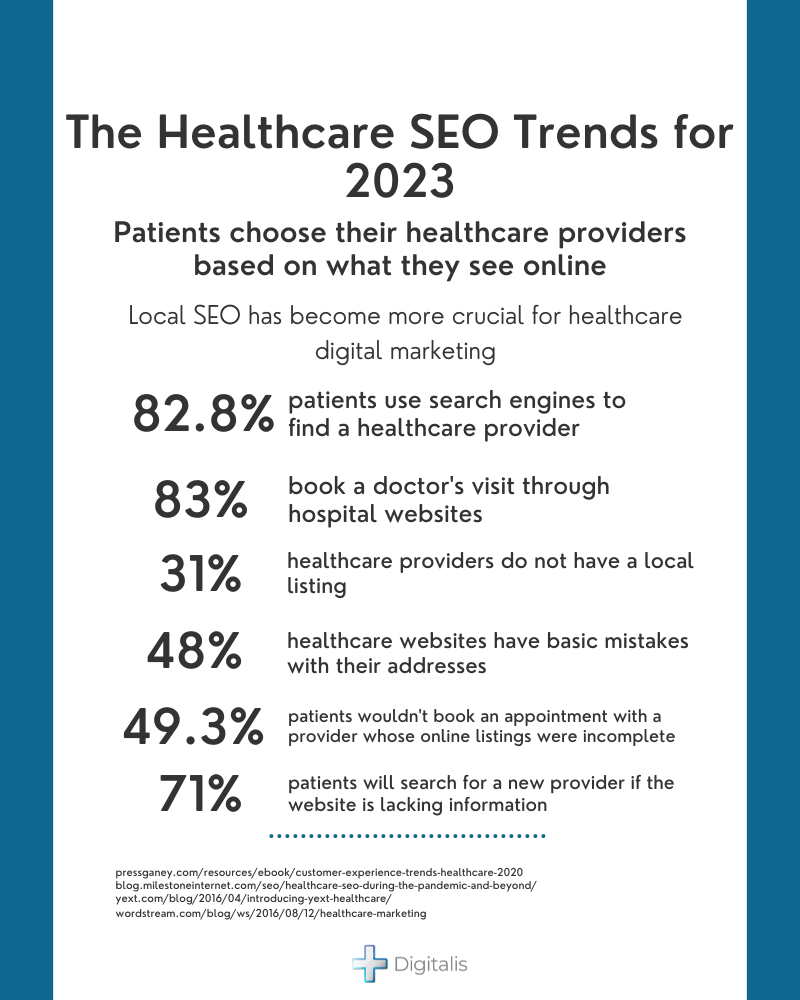
These days, most people (82%) looking for a dentist turn to a search engine first. That’s why it’s so important for your practice to show up clearly in local search results. When optimized correctly, a Google Business Profile (previously known as Google My Business) for dentists helps more patients find you online, book appointments easily,...
These days, most people (82%) looking for a dentist turn to a search engine first. That’s why it’s so important for your practice to show up clearly in local search results.
When optimized correctly, a Google Business Profile (previously known as Google My Business) for dentists helps more patients find you online, book appointments easily, and leave reviews that build your reputation.
At Weave, our solutions integrate seamlessly with your GBP to further streamline practice management, making efforts like review collection quick and easy. Below, we discuss everything your dental practice needs to know about building its online presence with Google Business Profile.
What Is Google Business Profile for Dentists?
Google Business Profile (GBP) is a free tool for managing your online presence across Google Search and Google Maps. This allows your practice to appear in the local services section of search results when prospective patients query things like “dental services near me” or “cosmetic dentistry in Santa Fe.” Optimizing your Google Business Profile increases your local visibility, promotes your brand, and provides potential patients with essential practice information.
The profile that users will see in search engine results or on Google Maps will display need-to-know information, including a business description, name, contact information, hours of operation, patient reviews, photos, a link to your dental website, and more. This allows potential patients to quickly get in touch with your family dentistry practice when they need to schedule services.
While Google Ads can work for dentists, potential patients often do not respond to paid advertising as much as they do to organic search results. When you rank high in local search results, you build your brand’s credibility and trustworthiness, which often leads to a more impressive ROI.
Creating and Verifying Your Google Business Profile
Potential patients cannot find your Google Business Profile until you’ve created, verified, and optimized it. Get started with these steps:
Step 1: Creating Your Google Business Profile
Creating a Google Business Profile for dentists is free and relatively simple:
Log In to Your Gmail Account
Log in to the Gmail account you wish to have associated with the business profile. Use a professional email account for your practice (e.g., contact@yourpractice.com).
Visit Google Business Profile
Go to Google Business Profile and click “Start Now” to begin the setup process.
Enter Your Practice Name
To create a GBP account, you will need to provide business information. Use your dental practice’s official name and avoid adding unnecessary keywords like “best” or “top.”
Select Your Business Category
Google Search Console categorizes businesses to help users easily find whatever they’re looking for. Select a primary category that represents your business, such as “Dentist,” and add secondary categories for your specialties. Secondary categories might be “Orthodontist,” “Cosmetic Dentist,” “Pediatric Dental Clinic,” etc.
Provide Your Address, Phone Number, and Business Hours
Beyond your business name, you also must provide essential information about your practice, such as your contact details. This way, when patients search for dental services, they can quickly find the right phone number to call.
Enter your practice’s address, contact details, website URL, and business hours. Make sure all details are consistent with your website and other online listings.
Add Photos and a Business Description
A great way to help patients find your dental clinic is by optimizing your listing with high-quality images. Upload a professional logo and a cover photo to your Google account.
At this point in the process, you’ll also have the opportunity to write a clear business description outlining your services and specialties.
Step 2: Verifying Your Google Business Profile
The verification process for GBP confirms that you are the owner of your dental practice, ultimately preventing fraudulent accounts. Verifying your GBP increases your credibility and may boost your online presence. To verify your dental practice’s account, follow these steps:
Verify Your Profile
Select “Get Verified” under your Business Profile. You cannot select your verification method.
Google may send a verification postcard to your practice’s listed address or request that you complete the process via email or phone. In some cases, you may simply be required to provide a video of your dental practice.
Complete the Verification
Next, follow the required verification steps. For example, if you’ve been mailed a postcard, you will need to log in to your Google Business Profile and enter the verification code on the card.
Step 3: Customizing Your Google Business Profile
The more you customize your listing, the more your business will stand out in search engine results. By adding specific information about your offerings and business, Google will better understand when to surface your profile to match user queries. Here are a few ways to optimize your account:
Add Services and Products
You can list specific services, offerings, and promotions on your account to help your profile stand out among the competition. You may list things like general dentistry, cosmetic procedures, or specialized treatments. Highlight any of your unique offerings so you can surface when potential clients search for things like “teeth whitening near me.”
Add Service Areas
Specify your service area to enhance your local SEO.
Create Google Posts for Engagement
You can use Google Posts to announce updates, special offers, and patient tips. Post as you would on your other social media accounts to keep your profile fresh and engaging.
Keep Your Profile Updated
Make sure that you regularly update your business hours, services, and key announcements if anything changes. For example, if your dental practice moves locations, update your address and use Google Posts to keep patients informed.
Optimizing Your Profile With Relevant Keywords for Local Search Results
Creating a Google Business Profile for dentists is only the first step. Now you can begin optimizing your account by following basic SEO practices. With local search optimization, you can ideally rank in the Google 3-Pack, helping your dental business appear at the top of results when patients need help the most.
To attract more patients to your listing, we recommend these tips:
- Add relevant keywords to your business description.
- Choose business categories that reflect what your practice offers.
- Regularly update your practice hours and services.
- Make sure your business name, address, and key information are consistent across all directories and websites.
Managing Patient Reviews To Maximize Your Online Presence
The more positive reviews you get, the more likely your practice is to show up when someone searches for a local dentist. Positive reviews build your online reputation, patient trust, and local SEO.
You can encourage patients to leave reviews after appointments by using automated feedback tools. For example, Weave automatically sends patients a convenient text with a link where they can leave their reviews after their appointment.
Be sure that you respond to negative and positive reviews professionally, showing patients that your dental practice cares.
Enhancing Your Dental Practice’s Profile With High-Quality Images
GBP listings with photos often get more clicks. We recommend uploading professional images of your practice and staff to improve your local search rankings. Commissioning a professional to create a virtual tour showcasing your office may also be helpful.
Videos can also boost engagement. Consider posting digital marketing videos showcasing your services, team, and office environment to engage potential patients.
Leveraging Google Posts To Engage Patients
Google Posts are a tool within GBP that allows you to share timely updates, promotions, and announcements. You can use Posts to promote special offers, new services, or patient testimonials. Consider sharing educational content about dental care in your posts.
Be sure to treat your posts as any other dental marketing campaign by incorporating calls to action (CTAs) into the content. You can add direct CTAs for patients to create appointments by using Weave’s online scheduling tool.
Using GBP Insights To Track Local SEO Performance
Google Business Profile offers an analytics tool that allows you to track how users interact with your profile. To measure your dental marketing efforts, we recommend tracking these metrics:
- Profile views
- New calls
- Engagement with posts and photos
- Google Maps rankings
- Search engine rankings
Use these insights to tweak your profile.
Common Mistakes To Avoid With Google Business Profile
When optimizing any Google Business Profile for dentists, practices must avoid these common mistakes:
- Incomplete or incorrect information: Ensure your business hours, contact information, and services are up to date to make it easy for patients to get in touch with you.
- Duplicate listings: Multiple listings for the same practice can harm your SEO and create confusion.
- Ignoring reviews: Patients want to see that you care about their feedback. Always respond to reviews.
How Weave Enhances Your Google Business Profile
At Weave, we aim to enhance your Google Business Profile to help you reach more potential patients. With our tools, you can:
- Add online scheduling to your GBP posts.
- Automate appointment reminders to reduce no-shows.
- Easily manage phone calls, emails, and texts to streamline patient interactions.
A well-maintained and optimized GBP is critical for attracting new patients to your practice. Combining GBP with Weave’s tools allows you to maximize efficiency and results. Request a demo of Weave today to see how our tools work with Google Business Profile for dentists.
Want to see
more about
Weave?
more about
Weave?
1 System for Phones, Texting, Payments, & More
Access a full suite of patient communication tools with Weave! Texting, payments, reviews, & scheduling in one place. Get started today!
Get StartedFrequently Asked Questions (FAQs)
Do Google ads work for dentists?
Yes, Google Ads can attract new patients fast with targeted local campaigns.
Is Google My Business really free?
Yes, Google My Business is completely free and boosts your local visibility.
What is the best business structure for a dentist?
Most dentists choose an LLC or S-Corp for liability protection and tax benefits.
How do I get more Google Reviews for my dental office?
Ask patients directly and use tools like Weave to send automated review requests.
Table of contents
What Is Google Business Profile for Dentists?Creating and Verifying Your Google Business ProfileOptimizing Your Profile With Relevant Keywords for Local Search ResultsManaging Patient Reviews To Maximize Your Online PresenceEnhancing Your Dental Practice’s Profile With High-Quality ImagesLeveraging Google Posts To Engage PatientsUsing GBP Insights To Track Local SEO PerformanceCommon Mistakes To Avoid With Google Business ProfileHow Weave Enhances Your Google Business ProfileFrequently Asked Questions (FAQs)
Ideas to help your practice grow.
Get practical insights, patient communication tips, industry trends, and new ways to increase efficiency and revenue—delivered monthly.


Ready to grow your practice?
See firsthand how Weave can help you grow your practice.