
Google Reviews: 5 Steps to Skyrocket Your Business Growth With Reviews
Article11 min read
According to a Weave study, 64% of consumers look to Google for reviews before visiting a business (read more about this study in our ebook here). Additionally, Google, today’s most powerful search engine, gives higher SEO rankings to businesses with multiple positive Google reviews. If you are a small business owner with room to grow...
According to a Weave study, 64% of consumers look to Google for reviews before visiting a business (read more about this study in our ebook here). Additionally, Google, today’s most powerful search engine, gives higher SEO rankings to businesses with multiple positive Google reviews.
If you are a small business owner with room to grow your business, and ignoring Google Reviews, you might as well take out all the money in your wallet and set it on fire.
Yes, online reviews really are that important. And yes, we are going to show you exactly how to use them to grow your business.
Here is what you can expect to learn from this article:
- How to Get More Google Reviews
- How to Leave a Google Review
- How to Remove a Review From Google
- How to Use Weave to Get More Reviews
9 out of 10 people check online reviews before choosing a business
Weave helps you easily collect and monitor reviews on Google and Facebook. These reviews can be some of the best marketing for your business.
Schedule Demo
How to Get More Google Reviews from Your Customers in Five Simple Steps
Step 1: Ask Your Customers for a ‘Favor’
If your customers have had a good experience with your business, they’re usually more than happy to “pay it back” through a positive customer review. Framing your request as a “favor” lessens your customers’ feeling of obligation. Interestingly enough, this makes them more likely to comply with your request. (1)
Asking for a favor not only shows that you have trust in your customers, but it also allows them the opportunity to provide support for you and your business.
When asked in the right way, most satisfied customers will be happy to leave a good business review. Get as many “favors” as you can because Google will automatically highlight any 3 of these reviews in your Google Review Summary section. (2)
While getting customers on board to write a Google business review is a huge milestone, remember that Google’s algorithm is also crawling for the right kind of reviews.
Step 2: Give Them A Reason To Write A Review
Giving a reason for your request increases the chances that your customers will oblige by up to 33%. Studies performed by a Harvard professor in 1978 revealed the power of the word “because”.
The study concludes that giving someone a reason that you are asking for something will increase your success rate, no matter the reason. (3)
When you’re asking for a review, be sure to include a reason. “Because we would love to hear your thoughts” or “because we care about what you think of our business” may just be a few extra words, but they can go a long way in improving your review response rate.
While there are far more technical reasons for requesting reviews, such as boosting local SEO to build online authority and trustworthiness, and providing recent feedback to prospects, you should keep explanations simple.
Step 3: Thank Them For Being Willing To Leave A Review
When it comes to customer service, gratitude is always a good idea.
In a cold email response study, response rates increased dramatically when gratitude was expressed in advance. (4)
Similarly, getting customer feedback via reviews can lead to improved customer service when acknowledged by a business.
Step 4: Have a Script and a Process
Now let’s see how these tips, altogether, work to increase your review generation rate. You’re welcome to copy this script or tweak it to fit your business’s unique needs.
“Hey __________ [customer name], thanks for coming in today! I was wondering if you could do me a favor?”
*Customer responds affirmatively*
“Would you mind writing a review of your experience? Because it really helps other customers decide to come here.”
*Customer responds affirmatively*
“Thanks! We really appreciate you being willing to do that! In a few moments, you will get a review request from our office. You can just follow the review link that we sent you. It makes it really simple!”
A happy customer is likely to reciprocate the positivity if you just ask. By making the process simple and introducing a little bit of psychology into the equation, you’re well on your way to acquiring a bank of positive reviews.
Step 5: Find A Review Software That Automates The Process
In an ideal world, everyone would have automated review software like Weave.
Review software allows you to request a review from the customer immediately after they’ve interacted with you. They get the request at the time when they’re most likely to leave you feedback. Weave even helps you respond to reviews more easily. Weave’s Response Assistant uses generative AI technology to create custom, relevant responses to your patient reviews to increase your reputation management efficiency and boost your brand awareness.
Usually, the request includes a link that they can click on. They will be sent to a review website like Google or Facebook, where they can leave feedback in just a few minutes.
Make Google Reviews Easy For Your Customers
No matter how amazing your customer experience is, making the feedback process easier will always increase your success.
Make your process for leaving Google reviews as simple as possible.
Ask Your Customers For Reviews
Did you know that while 71% of consumers would actually leave feedback if a business just asked, a whopping 30% of consumers have never been asked at all? (5)
Even casual requests can be effective and are certainly much better than not asking at all.
You may also like: How to Get Facebook Social Media Reviews and Should You Ask Customers for Reviews on Yelp?
How To Leave A Review on Google
Let’s start at the ground level. There are two different ways you can leave a Google review: through a browser or through the Google Maps App. The process is different for each, and yes, your customer will need a Google account to do it.
Write A Google Review From Your Browser
- Log in to your Google account, and search for the business you want to review.
- Find the reviews area (next to the star rating in your search results, or under the establishment’s name in the sidebar in Google search) and click on the blue font that says “WRITE A REVIEW.”
- Rate the business from 1 to 5 stars (the greater numbers indicate a positive experience), write about your experience, and click “POST” when you’re done.
Write A Review From The Google Maps App
- In the Google Maps app on your phone, search for the business that you want to review.
- Maps will return a search result with a map that includes a banner at the bottom about the business. Click that banner.
- Scroll down in the window that pops up until you get to the reviews section. You will see five stars unpopulated with your profile picture above them. Click on the number of stars you would like to leave for the business and proceed to write about your experience.
- Click “POST” to leave the review.
Writing a review is a simple process, even for your older customers. This process is even simpler when you use automated software.
How to Delete a Google Review
If you are a business owner, you’ve probably seen a negative review come across for your business at least once. The review could be the result of a misunderstanding with a customer, or even someone on your team dropping the ball, in which case, you should try to rectify the situation immediately.
Unfortunately, there is another common source of negative fake reviews that you can’t do anything to rectify. Those negative reviews come from competitors who are trying to tarnish your reputation. In an effort to do this, some competitors may post fake negative reviews about your business. In these scenarios, you’ll need a strategy for deleting Google Reviews.
Before we get too far into this process, you should know that this is not always guaranteed to work. However, it has worked on a number of occasions, so it’s often worth going through the process.
Step 1: Locate the Review on Google
Locate the fake Google review you are trying to remove. You can do that by searching for your business name on Google and clicking on the total number of reviews.
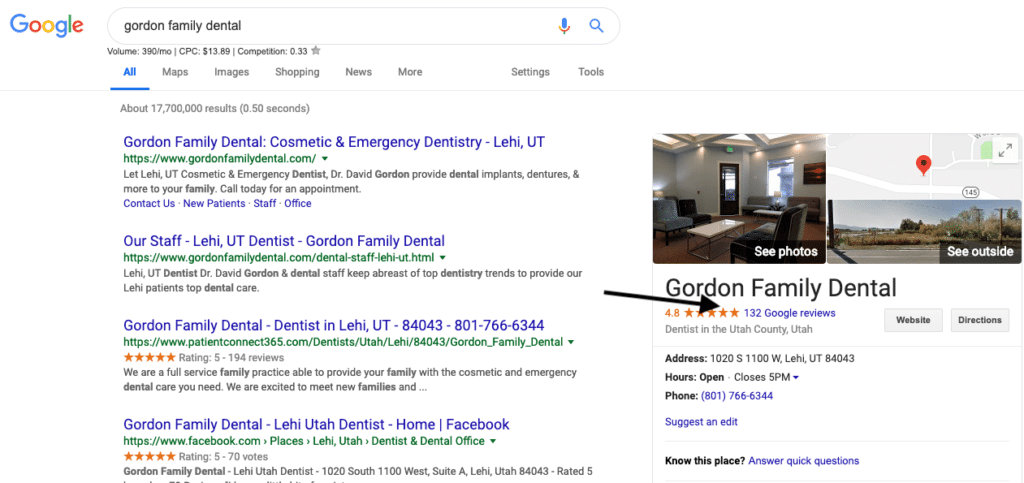
Step 2: Flag the Review
Locate the review that was left by your competitor and click the flag. To get the flag to show up, you will need to be hovering over the review.
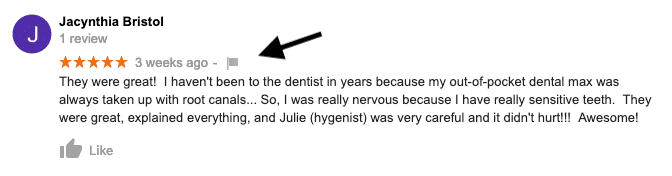
Step 3: Select Your Reason for Flagging the Review
When you click the flag, you will see these options:
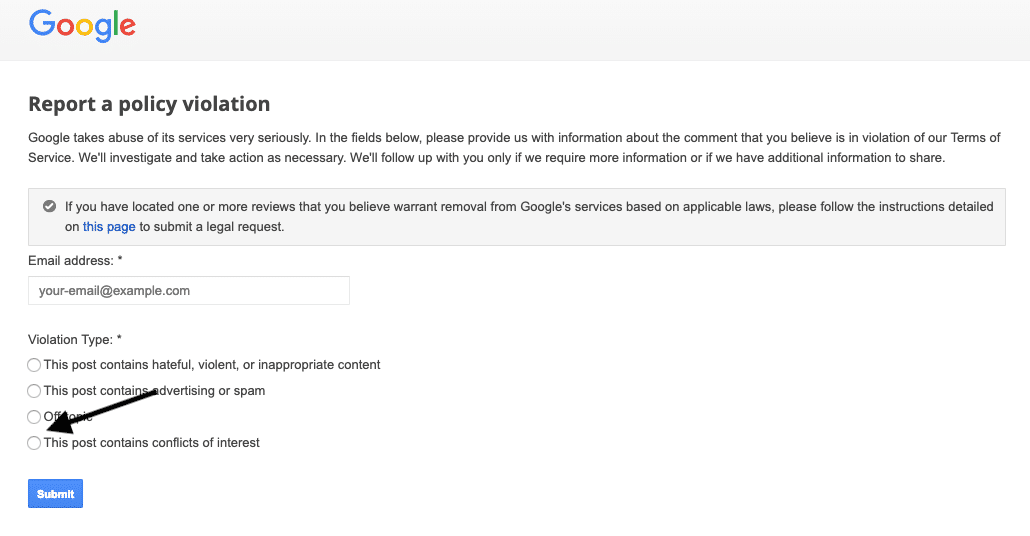
Click the circle that indicates that the post is a conflict of interest. Take a screenshot of your form filled out and save the screenshot with the date.
Note as well that Google’s policies consist of a list of 10 types of prohibited and restricted reviews, which Google might remove, not only when flagged, but automatically.
Step 4: Navigate to the Spam & Policy Forum
After a week or so has gone by, check whether the fake review was removed. If it hasn’t been, go to Google My Business community, and you will see a page in the search result that looks like this:
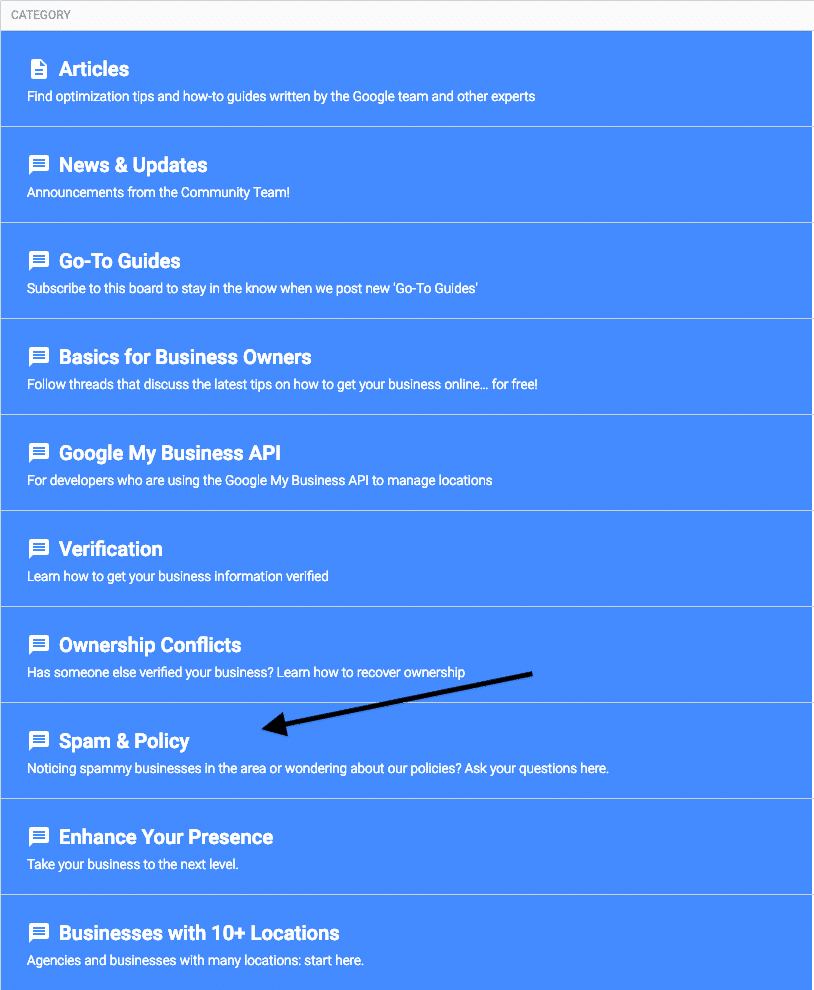
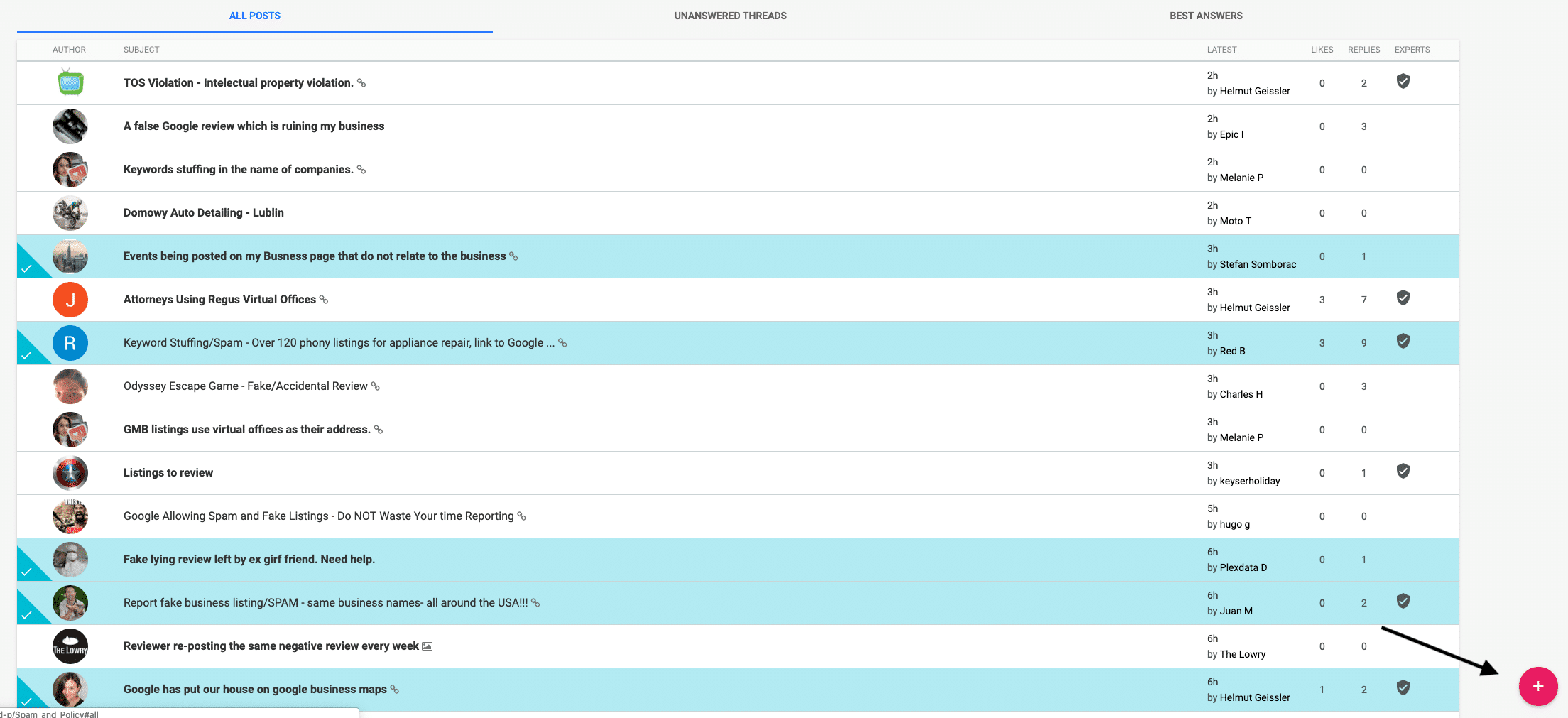
Click Spam & Poli,cy and you will be taken to a page that looks like this:
Step 5: Submit Your Case
Click the plus in the lower right-hand corner to start your post in the forum. In the interest of your reputation management, you need to be as persuasive as possible about the fact that this review was not from a real customer. Explain how you know that it is a competitor, attach the image showing that you flagged the review first, then submit your post. The more descriptive you are and the more details you have to back up your position, the more likely you are to successfully get the bad review deleted.
This forum is typically very quick to respond, so you should know within the day whether your report will be escalated.
Using Weave to Get More Google My Business Reviews
Interestingly (but not surprisingly), a well-established Weave dental office in Oklahoma City was able to increase its new patient flow by 324% from May 2017 to now. This office was seeing around 17 new patients a month consistently for several years, and with less than 10 online reviews at the time, saw a plateau in their active patient base. Then they signed up for Weave and activated Auto-Text Reviews–they are now seeing 76 new patients a month and have over 200 online reviews.
Rika Markel, of West Side Family Dental Group, said, “Weave has made all the difference in our dental practices. Easy to use for recalls, confirmations, etc. But most importantly, the review feature helped us to get on the first page of Google.”
A positive review can have a great influence on a potential customer looking up your business online. Will you try to get at least one new review today? Schedule your demo to learn how Weave is promoting national, regional, and local business online reputation.
Want more info about getting a Google customer review? Download FREE Ebook: Everything a Business Owner Needs to Know About Google Reviews
Online Review PlatformSee how automated review management helps build your reputation and attract new clients.
Visit the Weave Reviews page to discover how automated text prompts, multi-platform monitoring, and easy response tools make collecting 5-star Google and Facebook reviews effortless.
Learn More
Frequently Asked Questions (FAQs)
How do you review a business on Google?
First, log in to your Google account. Search on Google for the business you want to review. Click on the number of reviews that shows in blue text. Click to write a review in the top right-hand corner.
Can you write a Google review without having an account?
No. While this was a possibility in earlier days of Google Reviews, you can no longer leave a Google review without having an account.
How do I leave a Google review anonymously?
There is no longer a way to write reviews anonymously on Google. Google will automatically connect your review to your Google account.
How do I see my Google reviews?
To see your Google reviews, you can either log in to the Google Business Manager review site and manage reviews from inside your dashboard, or you can search for your business and click on the number of reviews linked in blue and see your reviews from there.
How long do Google reviews stay posted?
Google reviews will stay posted indefinitely unless the writer of the review decides to delete the review.
How do I write a review on Google?
If you are a reviewer looking for actual tips on what you should say in your Google review, remember to be honest, civil, describe the service received, be specific, ensure you are reviewing the intended company, and update the review if necessary.
Is a Google Business Profile free?
Yes, it is. So, there’s no reason to hesitate to get one so your business information can appear accurately on Google tools like the search engine and Google Maps.
What’s a Google reviews widget?
A Google review widget is a simple code that you can add to your website to display your Google reviews on your website.
What is Google seller rating?
You’ve likely seen Google seller ratings in your Google searches below ads in the form of a star rating.It’s typical for e-commerce companies to use Google Seller Ratings, but it’s available to any company.
Resources:
- https://www.forbes.com/sites/salesforce/what-good-customer-service/
- https://support.google.com/business/answer
- https://www.psychologytoday.com/us/blog/brain-wise/the-power-the-word-because-get-people-do-stuff
- https://hbr.org/the-big-benefits-of-a-little-thanks
- https://searchengineland.com/70-consumers-will-leave-review-business-asked
Article last updated on October 6, 2026
Table of contents
Ideas to help your practice grow.
Get practical insights, patient communication tips, industry trends, and new ways to increase efficiency and revenue—delivered monthly.


Ready to grow your practice?
See firsthand how Weave can help you grow your practice.